One of the most utilized feature of the Oracle Forms is the LOV. Tough Oracle Forms provide us with plenty of functions and properties to customize LOV's appearance and behavior at runtime we still lack some control on LOV:
there is Set_LOV_Column_Property to change column's width and title but there is no any Get_LOV_Column_Property;
there is no way to recognize how many columns are there;
there is no way to get actual size of the LOV. For some reason Get_LOV_Property( LOV_SIZE ) always returns design time width and height;
This is a JavaBean (java part was done by my coworker Michel Kizhner) that fix these breaches by silently parsing LOV's window structure at runtime and sending the result back to Forms via custom event call. Also to make development easier there is UTL_LOV package that wrap all the details of communication to this JavaBean. With this package you can:
UTL_LOV.Get_LOV_Column_Property( <lov_name>,<column>, WIDTH ) UTL_LOV.Get_LOV_Column_Property( <lov_name>,<column>, TITLE )
get actual size of the LOV:
UTL_LOV.Get_LOV_Property( <lov_name>, LOV_SIZE ) if you need for any reason design time width and height you can get it with UTL_LOV.Get_LOV_Property( <lov_name>, WINDOW_SIZE )
See UTL_LOV package specification for more details.
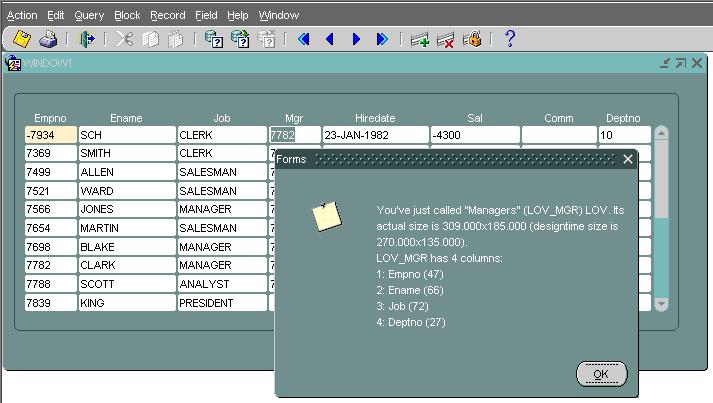
.Add it to the archive tag of the /forms/server/formsweb.cfg file . Open the lovaddon.fmb module (Oracle Forms 10.1.2) . Compile all and run the module .Logon as scott/tiger . Navigate to MGR or DEPTNO field and invoke LOV . Dismiss LOV with OK or Cancel then you should see alert described the LOV you just called
For any question concerning this bean, send a mail to Oleg atsch@kled.org.



/http%3A%2F%2Ffdtool.free.fr%2Fbeans%2Fgmapbrowser%2FGMapBrowser.jpg)
/https%3A%2F%2Fassets.over-blog.com%2Ft%2Fcedistic%2Fcamera.png)
/http%3A%2F%2Ffdtool.free.fr%2FLAF%2Fbrickdown1.jpg)