
This is a bunch of tips and techniques related to Oracle PL/SQL and Forms.
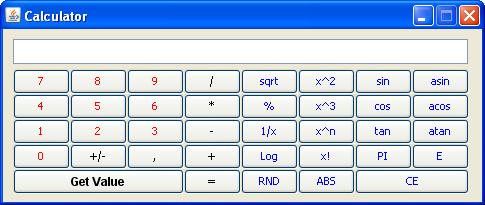
The implementation class of the Bean Item
oracle.forms.jvr.Calculator
The Java code
Calculator.java CalculatorOperations.java
The methods you can call
Set_Custom_Property('BL.BEAN',1, 'SET_TITULO','Calculator');
Set_Custom_Property('BL.BEAN',1, 'SET_BOTON','Get Value');
Set_Custom_Property('BL.BEAN',1, 'SET_POSICION','300,150');
Set_Custom_Property('BL.BEAN',1, 'SET_VALORINICIAL','');
Set_Custom_Property('BL.BEAN',1, 'SET_MODO','');
Set_Custom_Property('BL.BEAN',1, 'SHOW','');
The event sent by the Java Bean
The sample dialog
. Download the Calculator.zip file
. Unzip the Calculator.zip file
. Copy the Calculator.jar file in your /forms/java/ folder
. Add it to the archive tag of the /forms/server/formsweb.cfg file
. Open the Calculator.fmb module (Oracle Forms 10.1.2)
. Compile all and run the module
The jar file must be signed
The jar file provided with the .zip file is already signed
For any question concerning this bean, send a mail to Jesus at vallejo.jesus@gmail.com.


/http%3A%2F%2Ffdtool.free.fr%2Fbeans%2Fgmapbrowser%2FGMapBrowser.jpg)
/https%3A%2F%2Fassets.over-blog.com%2Ft%2Fcedistic%2Fcamera.png)
/http%3A%2F%2Ffdtool.free.fr%2FLAF%2Fbrickdown1.jpg)