
This is a bunch of tips and techniques related to Oracle PL/SQL and Forms.
Purpose
Here is a Java bean that allows to capture the mouse events and display the properties and methods of the clicked component.
In this second chapter, the bean is able to etablish the correspondance between the Java components and the Forms module's items.
When the mouse enter an item, the background color is changed, then an event is sent to Forms to indicate which item is concerned. The message indicates the Forms item name.
This demonstrates that you can get events from every item with a single Bean component.
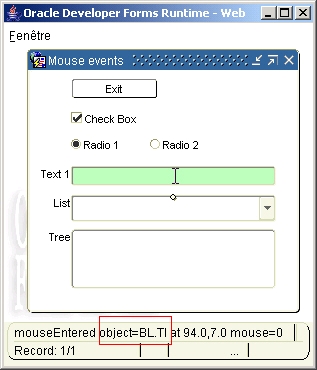
Right-click on a component to display its properties and methods.
The Java code
HandleMouseEvent2.java
The implementation class of the Bean Item
oracle.forms.fd.HandleMouseEvent2
The methods you can call
* Enable/disable mouse event capture
Set_Custom_Property('BLOCK.ITEM', 1, 'SETEVENT', 'parameter');
where parameter is:
event name,boolean
e.g. :
Set_Custom_Property('BL.BEAN', 1, 'SETEVENT', 'PRESS=FALSE' ) ;
event name can be one of the following:
- MOVE (mouse move)
- EXIT (mouse exit)
- PRESS (mouse button pressed)
- REL (mouse button released)
- ENTER (mouse enter)
- CLICK (mouse click)
By default, the MOVE event is disabled.
* Enable/disable all mouse events
Set_Custom_Property('BLOCK.ITEM', 1, 'ALLOWEVENT', 'true|false');
* Set the highlight mode
The highlight mode is used to colorize the item background when the mouse entered in it.
Set_Custom_Property('BLOCK.ITEM', 1, 'SETHIGLIGHT, 'mode');
where mode can be:
- a positive value to brighter the current item background color
- a negative value to darker the current item background color
- a valid r,g,b value
- false (to avoid automatic coloration)
e.g.:
-- darker --
Set_Custom_Property('BL.BEAN', 1, 'SETHIGLIGHT', '-20' ) ;
-- brighter --
Set_Custom_Property('BL.BEAN', 1, 'SETHIGLIGHT', '20' ) ;
-- special color --
Set_Custom_Property('BL.BEAN', 1, 'SETHIGLIGHT', '185,255,185' ) ;
-- no highlight --
Set_Custom_Property('BL.BEAN', 1, 'SETHIGLIGHT', 'false' ) ;
* Send the Forms item properties to the bean
Set_Custom_Property('BLOCK.ITEM', 1, 'SETPROP', 'properties');
where properties are:
item name, X position on canvas, Y position on canvas
e.g.:
Set_Custom_Property( 'BL.BEAN', 1, 'SETPROP','BL.PBUTTON,40,30' ) ;
This last method is used to communicate the item coordinates to the Bean, so it can etablish the matching between the Java component and the Forms items.
It is used in the SetProperties() Forms procedure that scans the visible items of the form.
Note : the coordinates used by the java bean are pixel, so the Forms coordinate system must be set to pixel too.
If your coordinate system is different, here is a procedure that convert inches, points or centimeters to pixels:
Declare
LC$Scoord VARCHAR2(100) := Get_Form_Property( Name_in('system.current_form'), COORDINATE_SYSTEM ) ;
Begin
-- Convert to pixel --
If LC$Scoord = 'INCHES' Then
value := value * 0.0104 ;
ElsIf LC$Scoord = 'POINTS' Then
value := value * 1.333 ;
ElsIf LC$Scoord = 'CENTIMETERS' Then
value := value * 0.0263 ;
End if ;
End ;
The event raised by the bean
* SENDMSG
This event is raised by the bean to inform Forms that a mouse event has occured.
4 properties are provided:
- MSGEVENT : event raised (mouse enter, exit, click, move, press)
- MSGTYPE : type of the component ( e.g. oracle.forms.ui.VButton for a PushButton)
- MSGITEM : class name of the component
- MSGCOORD : coordinates of the mouse pointer
- MSGBTMOUSE : mouse button number
IF (eventName='SENDMSG') THEN
-- get the mouse message --
eventValues := get_parameter_list(:system.custom_item_event_parameters);
get_parameter_attr(eventValues,'MSGEVENT',eventValueType, LC$Event);
get_parameter_attr(eventValues,'MSGTYPE',eventValueType, LC$Type);
get_parameter_attr(eventValues,'MSGITEM',eventValueType, LC$Item);
get_parameter_attr(eventValues,'MSGCOORD',eventValueType, LC$Coord);
get_parameter_attr(eventValues,'MSGBTMOUSE',eventValueType, LC$Button);
LC$Msg := LC$Event
|| ' object=' || LC$Type
|| ' item=' || LC$Item
|| ' at ' || LC$Coord
|| ' mouse=' || LC$Button ;
clear_message;
Message(LC$Msg, no_acknowledge) ;
Synchronize ;
* SENDPROPS
This event is raised by the bean to inform Forms that the property and method information of the component has been sent.
In the sample dialog, this information is stored in a Text item, then displayed via the Edit_TextItem() Forms built-in.
It can be displayed by right-clicking on anywhere on the screen.

ELSIF (eventName='SENDPROPS') THEN
-- get the component properties --
eventValues := get_parameter_list(:system.custom_item_event_parameters);
get_parameter_attr(eventValues,'MSGPROPS',eventValueType, LC$Msg);
:BL.PROPERTIES := Replace(LC$Msg, '/n', CHR(10));
Set_Custom_Property('BL.BEAN', 1, 'ALLOWEVENT', 'false' ) ;
Go_Item('BL.PROPERTIES');
edit_textitem ;
Set_Custom_Property('BL.BEAN', 1, 'ALLOWEVENT', 'true' ) ;
END IF;
The sample dialog
. Download the mouseevent2.zip file
. Unzip the file
. copy the handlemouseevent2.jar file in the <ORACLE_HOME>/forms/java directory
. Edit your /forms/server/formsweb.cfg file to add this jar file
. Open the MOUSEEVENT2.fmb module (Oracle Forms 10.1.2)
. Compile all and run the module
Using the JInitiator:
Tom Casserly provides, here, an equivalent that runs correctly with JInitiator.
Download the JInititator compatible version


/http%3A%2F%2Ffdtool.free.fr%2Fbeans%2Fgmapbrowser%2FGMapBrowser.jpg)
/https%3A%2F%2Fassets.over-blog.com%2Ft%2Fcedistic%2Fcamera.png)
/http%3A%2F%2Ffdtool.free.fr%2FLAF%2Fbrickdown1.jpg)