
This is a bunch of tips and techniques related to Oracle PL/SQL and Forms.
Purpose
Here is a Java Bean that allows sending back to the Forms application each key pressed in any Text Item.
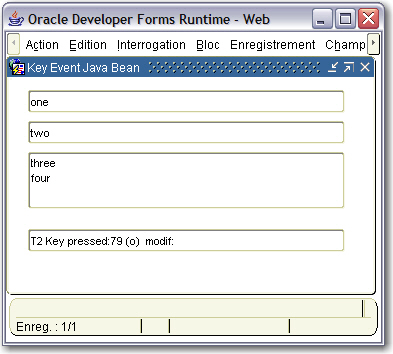
The Java code
keypressed.java
The implementation class of the Bean Item
oracle.forms.fd.KeyPressed
The methods you can call
Initialize the bean
Set_Custom_Property('BLOCK.ITEM',1,'INIT','');
This method must be called in the When-New-Form-Instance. It is used to search for every Text Items in the Forms to attach to them a key listener.
e.g.:
-- Init the bean --
Set_Custom_Property( 'BL.BEAN', 1, 'INIT', '' ) ;
The event fired by the JavaBean
KEY_PRESSED
It is constituted by 3 parameters to get the key code, the key char and the key modifier.
To know what text item has just fired the event, ask the :SYSTEM.CURSOR_ITEM variable.
When-Custom-Item-Event:
DECLARE
eventName varchar2(30) := :system.custom_item_event;
eventValues ParamList;
eventValueType number;
LC$Code varchar2(25); -- code
LC$Char varchar2(25); -- char
LC$Modif varchar2(25); -- modifier
BEGIN
IF (eventName='KEY_PRESSED') THEN
eventValues := get_parameter_list(:system.custom_item_event_parameters);
get_parameter_attr(eventValues,'KEY_CODE',eventValueType, LC$Code);
get_parameter_attr(eventValues,'KEY_CHAR',eventValueType, LC$Char);
get_parameter_attr(eventValues,'KEY_MODIFIER',eventValueType, LC$Modif);
:BL.RESULT := :System.cursor_item || ' Key pressed:'|| LC$Code || ' (' || LC$Char||') '||' modif:'||LC$Modif ;
Synchronize ;
END IF;
END;
The sample dialog
. Download the keypressed.zip file
. Unzip the file
. copy the keypressed.jar file in the <ORACLE_HOME>/forms/java directory
. Edit your /forms/server/formsweb.cfg file to add the keypressed.jar .
. Open the KEYPRESSED.fmb module (Oracle Forms 9.0.2)
. Compile all and run the module


/http%3A%2F%2Fsheikyerbouti.developpez.com%2Fimages%2Ffrite.jpg)
/http%3A%2F%2Ffdtool.free.fr%2Fforms-pjc-bean%2Fhtmlpane%2Fhtmlpane.jpg)
/http%3A%2F%2Ffdtool.free.fr%2Fforms-pjc-bean%2Fkeytyped%2Ffiles%2Fkeytyped.png)
/https%3A%2F%2Fassets.over-blog.com%2Ft%2Fcedistic%2Fcamera.png)